
Zoom Boxing Coaching Setup: Complete 2026 Workflow
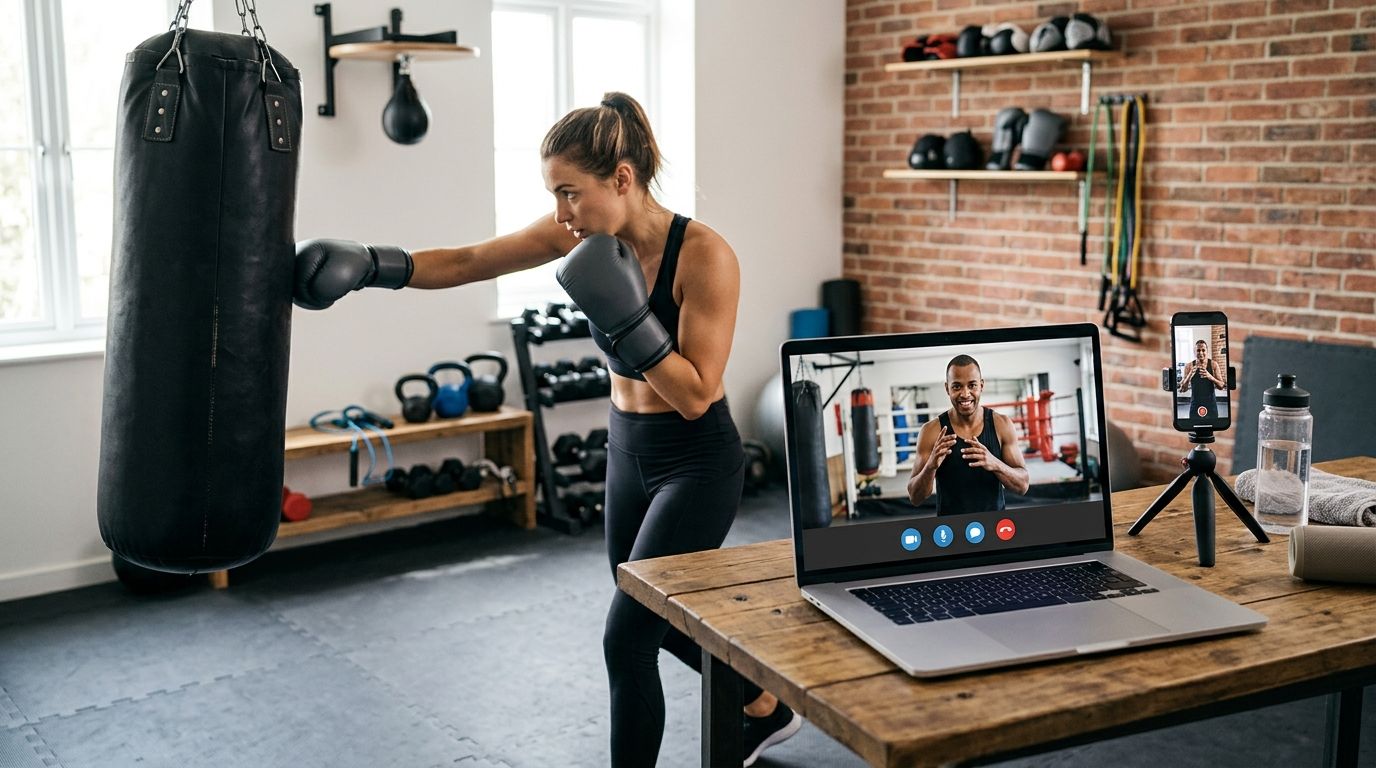
Most virtual boxing lessons fail for one reason: the camera setup, not the internet connection. Get the Zoom boxing coaching setup right once — camera height, floor space, device angle — and every live 1-on-1 session with Coach Chris Persaud runs the same as an in-person lesson, from stance correction to mitt work review.
• Zoom boxing coaching setup in 2026 depends on camera height and floor space more than internet speed. • Better Through Boxing runs live 1-on-1 lessons worldwide via Zoom with Coach Chris Persaud, no gym required. • An 8x8 to 10x10 foot clear space and chest-height camera let the coach see full stance and footwork. • A hotel-room variant of the same setup works for frequent travelers without breaking a training block.
Why this matters
A laptop camera propped on a kitchen counter shows a torso. It does not show footwork, weight transfer, or the pivot on a rear hook. Real boxing coaching depends on the coach seeing your whole body move — which means the setup has to be built for that before the first lesson, not fixed mid-session while you're supposed to be learning defense. Better Through Boxing runs private, live virtual coaching for beginners through competitors specifically because Zoom, set up correctly, replicates a real corner view. Skip the setup step and you get generic fitness boxing coaching through a screen. Do it right and you get real stance, footwork, and mitt-work feedback in 2026 the same way you'd get it in a gym.
Before you start
• A Zoom account (the free tier is enough) and an email address for booking confirmations. • A device stand or tripod — handheld phones during a lesson are the single biggest reason coaches can't call corrections in real time. • 8x8 to 10x10 feet of clear floor space. Garages, basements, and driveways all work. The gotcha that bites people at their first lesson: bandwidth is rarely the problem. A rock-solid wifi connection is useless if the camera sits at waist height six feet away — the coach sees your gloves and nothing else. Fix the angle before you worry about the megabits.
Set up your Zoom camera and space
• Open Zoom and sign in. Under Settings, click Video and confirm the feed is sharp, not blurry or dark. • Elevate your device to chest height on a stand or tripod, positioned 6 to 8 feet back from where you'll stand. • Clear an 8x8 to 10x10 foot area. Mark the boundary with tape or a rug edge so you don't drift out of frame mid-combination. • Check that your full body — head to feet — sits inside the frame when you square up in your stance. Expected result: the coach can see your stance, guard, footwork, and head movement without asking you to reposition. Equipment matters here too. A beginner boxing equipment setup that includes a stand-mounted device, non-slip flooring, and enough clearance for a heavy bag if you have one keeps the space consistent lesson to lesson.
Configure your device and connection
• Connect via Ethernet if your setup allows it. If not, sit within 10 feet of your router. • Close bandwidth-heavy apps — streaming, large downloads, cloud backups — before the session starts. • Under Zoom Settings, click Audio and run Test Speaker & Microphone to confirm the coach's counts and corrections come through clearly. • Set Zoom's video to HD under Video Settings if your connection supports it; drop it to standard definition if you see lag. Expected result: no freezing or audio delay during combination drills, where a half-second lag makes timing cues useless.
Book and calibrate your first live session
• Book your session and confirm the time by email. • Log into Zoom five minutes early and re-check your frame — lighting shifts throughout the day, especially near windows. • In the first 10 minutes, Coach Chris Persaud checks camera framing and stance visibility before any drilling starts, adjusting your angle live if needed. Expected result: the coach confirms a full, clear view of your body before the lesson moves into technique. Book your first live session Live 1-on-1 Zoom coaching with Coach Chris Persaud, worldwide.
Running the same setup on the road
The core setup doesn't change for a hotel room — it shrinks. Push furniture back, use a bed frame or luggage rack as a makeshift stand, and accept a tighter 6x6 foot working area for footwork drills instead of full ring movement. What does change: expect the lesson to lean more on stance, guard, and combination work than lateral footwork, since most hotel rooms can't fit a full pivot sequence. That's a deliberate trade-off, not a downgrade — the virtual boxing lessons for frequent travelers approach keeps a training block going through a business trip without losing the fundamentals.
Troubleshooting
Lesson lags during combinations. Drop Zoom's video quality to standard definition under Video Settings, or switch from wifi to a wired connection if one is available. Coach can't see your feet. The camera is too high or too close. Lower it to chest height and back it up to the full 6-8 foot range. No 8x8 space available. Shift the lesson toward stance, guard, and upper-body combination work rather than footwork drills — tell the coach before the session starts so the plan adjusts. Audio delay on counts. Wired headphones fix most lag that wireless earbuds introduce. Test this before the lesson, not during it. Screen glare washing out your form. Reposition so the light source is behind the camera, not behind you — backlighting turns your whole body into a silhouette the coach can't read.
Customize your workflow
Once the Zoom setup is solid, the next decision is gear. A properly fitted pair from a beginner boxing gloves guide matters more on camera than in person, since loose wrist wraps and bad glove fit are exactly the kind of small errors a coach catches on video that get missed in a noisy gym. If you're weighing whether private virtual coaching fits your budget against gym classes, a private boxing lesson cost breakdown lays out what to expect in 2026. “If the coach can't see your feet, the lesson is fitness boxing on a screen, not real boxing coaching.”
FAQ
What do I need for a Zoom boxing coaching setup in 2026? You need a Zoom account, a device on a stand at chest height, and 8x8 to 10x10 feet of clear floor space. A wired or strong wifi connection matters less than camera positioning. Can I do live boxing lessons on Zoom without a heavy bag? Yes. Stance, footwork, defense, and mitt-work mechanics can all be coached without a bag in the room. A bag adds power work later but isn't required to start. How much space do I need for a virtual boxing lesson? Plan for 8x8 to 10x10 feet of clear floor for full footwork drills. A 6x6 foot space still works for stance, guard, and combination work. Is live 1-on-1 Zoom boxing coaching as effective as in-person? For technique correction, yes, when the camera setup gives the coach a full view of your stance and movement. What changes is access to equipment like heavy bags or mitts, not the quality of technical feedback. What's the biggest mistake people make setting up for a Zoom boxing lesson? Holding the phone by hand or propping it too low. A stand at chest height, 6 to 8 feet back, is the fix that solves most framing problems before the lesson starts. Can I train for boxing over Zoom while traveling? Yes, using a smaller footprint of the same setup — a stand improvised from furniture and a 6x6 foot working area, with the session leaning more on stance and combinations than footwork. Does internet speed matter for virtual boxing coaching? It matters less than camera angle in most home setups. A wired connection or close proximity to a router prevents lag during fast combination drills, but a strong connection with a bad camera angle still produces a poor lesson.
One last thing
The first 10 minutes of a live session aren't warmup — they're calibration. Coach Chris Persaud checks your camera framing and stance visibility before any technique work starts, which is the single step that separates a real boxing lesson over Zoom from generic fitness boxing on a screen. Get that calibration right in 2026 and the rest of the setup takes care of itself.
Train with Coach Chris
Ready to put this into practice with a coach watching every rep? Better Through Boxing is private, 1-on-1 coaching with Christopher Persaud — CoachUp's #1 ranked NJ trainer. Train live online over Zoom from anywhere in the world, or work the mitts in person across New Jersey. Book a session at betterthroughboxing.com and get real-time corrections on your stance, footwork, and punches.
Train anywhere with the Ronin Box app
Voice-cued boxing workouts, round timer, and progress tracking — coached by Chris, right in your pocket.

Scan to install