

Phone Tripod Setup for Virtual Boxing Lessons
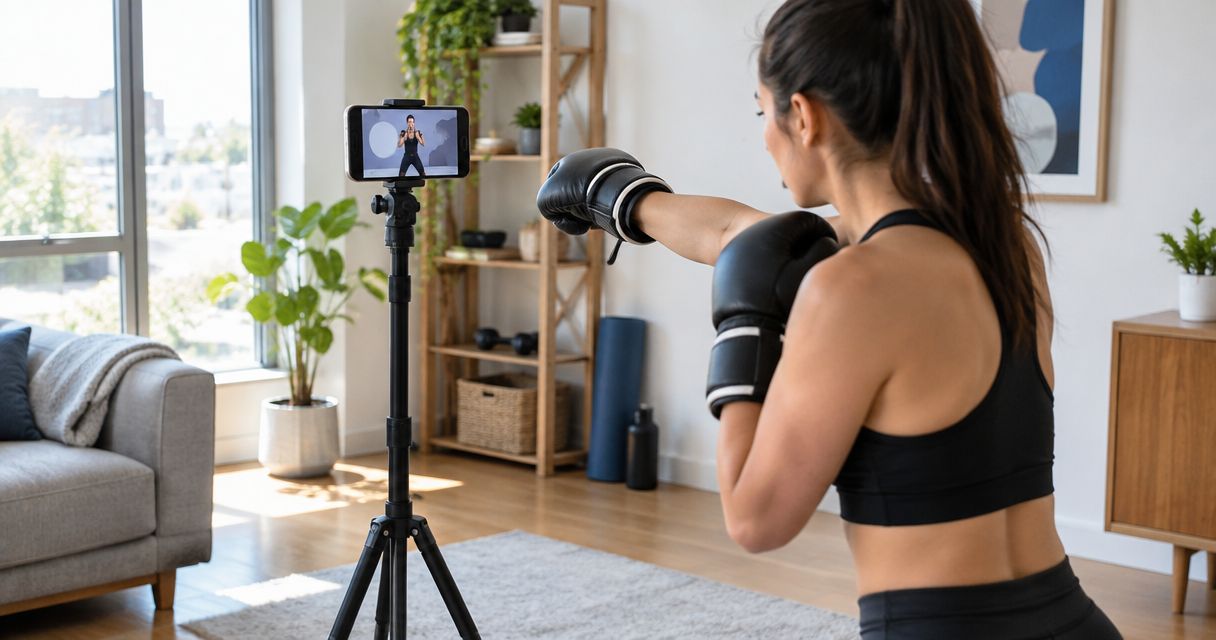
Propping a phone against a water bottle drops the frame the second you throw a real combination, and the coach loses your feet exactly when footwork matters most. Instead of holding the phone or balancing it on a stack of books every round, mount it on a tripod once, and every live virtual boxing lesson starts already framed correctly.
• A phone tripod setup for virtual boxing lessons needs full-body framing, not a chest-up video call view. • Best position for 2026 Zoom boxing lessons: tripod 6-8 feet back, lens at chest height, gallery view off. • Mark the tripod spot on your floor so every lesson starts framed the same way without resetting. • Skip tabletop tripods under 40 inches tall — Coach Chris Persaud needs your stance and feet, not just your gloves. • A second, closer angle works for mitt-work review; the wide, head-on frame works for footwork and combinations.
Why this matters
A phone balanced against a lamp shifts every time you plant your rear foot, and by round three the frame shows your shoulders and nothing below your waist. Coach Chris Persaud coaches stance, footwork, and hand position in real time during live virtual boxing lessons — if the camera can't see your feet, half the coaching cues get lost before they're spoken. A tripod fixes this once instead of every round. Set it up correctly before your first 2026 Zoom lesson and you stop losing training minutes to framing resets. BEFORE YOU START • A tripod with a phone clamp, not a selfie stick — you need a locking head, not a handheld grip that drifts. • A stable Wi-Fi connection that holds video without dropping frames; a phone hotspot competing with other devices in the house causes stutter mid-round. • The gotcha: lock your phone's orientation to landscape before it goes on the tripod. Zoom mirrors portrait video into a narrow vertical strip that crops your lead foot out of frame mid-session, and there's no way to fix that once the lesson has started.
Set up your tripod and phone mount
• Extend the tripod legs to full height and lock the center column so it doesn't sink under its own weight. • Open the phone clamp jaws wide and insert the phone with the camera lens centered in the notch, not off to one side. • Tighten the clamp thumbscrew until the phone doesn't slide when you tap the screen. • Rotate the mount to landscape orientation and lock the tripod head in place. Expected result: the phone sits stable at roughly hip-to-chest tripod height, in landscape orientation, and doesn't shift when tapped.
Position the tripod for full-body framing
• Stand where you'll actually train and open Zoom's self-view to check the frame live. • Walk the tripod back until your gloves, stance, and both feet are all visible on screen at once. • Set the lens height at roughly chest height — too low exaggerates your jab, too high crops your footwork out entirely. • Mark the tripod's floor position with a strip of tape so you can rebuild the same frame every lesson without re-measuring. Expected result: full body from head to feet visible in the Zoom self-view, lens at chest height, frame repeatable session to session.
Configure Zoom for your live lesson
• Open Zoom, tap the video icon, and confirm the tripod-mounted phone camera is selected — not a paired laptop camera in another room. • Turn off Touch Up My Appearance and any virtual background. Both soften edges Coach Chris Persaud needs to see your guard and elbow position clearly. • Switch to Speaker View instead of gallery view so your own feed stays large on screen rather than shrinking into a grid. • Tap the mic icon and confirm it's unmuted before the coach joins — missed audio means missed coaching cues in the first minute of the lesson. For the full breakdown of getting from a cold Zoom invite to a structured lesson, see the Zoom to live 1-on-1 coaching workflow. Expected result: your own video tile fills most of the screen, the correct camera is selected, and the mic is live before the coach joins.
Test your camera angle before the lesson starts
• Join a solo test Zoom meeting and throw a few jabs while watching your own self-view or a recording. • Run through the checklist: • Full-body framing • Eye-level height • Stable base • Clear background • Adjust tripod distance or height until every item checks out before the actual lesson begins. Expected result: a solo test clip shows your full body, a steady frame with no wobble on foot strikes, and no clutter behind you.
Switch the setup for mitt work and combo review
When Coach Chris Persaud calls for lateral footwork or pivot drills instead of straight combinations, angle the tripod about 30 degrees off center rather than dead-on. A straight-on frame hides pivots because your own shoulders block the camera's view of your rear foot as it turns. Pull the tripod slightly closer for mitt-work review sessions where hand speed matters more than full-body movement — the coach needs to read your guard and return path, not the whole room. If you're also tracking heart rate during the same session, that's a separate device pairing, not a tripod adjustment. “If the coach can't see your feet, the lesson is just cardio.”
Troubleshooting
• Frame cuts off your feet mid-round: the tripod is too close or too high. Move it back to your taped floor mark and drop the head to chest height. • Video looks dark or backlit: a window or lamp is behind you, blowing out your silhouette. Move the tripod so the light source faces you, not the lens. • Zoom keeps focusing on the wall instead of you: tap directly on your own image in self-view to lock focus before the lesson starts. • Tripod wobbles every time you plant your feet: soft carpet or uneven garage flooring is the usual cause. Set the tripod on a hard, flat section or add a furniture pad under each leg. • Phone overheats and Zoom drops mid-lesson: direct sun or a case blocking airflow is the culprit. Pull the case off for the session and keep the tripod out of direct light.
Customize your setup
Once the tripod frame is dialed in, the rest of the training space matters just as much. A cleared floor, a wall that reads clean in self-view, and starter gear that doesn't clutter the shot all affect what Coach Chris Persaud can actually see and correct during a 2026 lesson. A tripod fixes the camera problem. It doesn't fix a floor covered in loose wraps or a bag crowding the frame — that's a separate setup pass worth doing once, the same way you dial in the tripod once. Book a live virtual boxing lesson Train live with Coach Chris Persaud over Zoom, worldwide, from your own tripod setup.
FAQ
What's the best tripod height for virtual boxing lessons? Set the phone lens at chest height, not eye height. Chest height keeps your hips, guard, and footwork all in frame, while eye-level framing (the default for video calls) crops out everything below your waist. How far should the tripod be from me during a Zoom boxing lesson? Roughly 6 to 8 feet back is enough to fit your full stance, both hands, and both feet in frame. Closer than that crops your feet; farther than that makes hand detail hard for the coach to read. Do I need a ring light for virtual boxing coaching? Not a dedicated ring light, but you do need light facing you rather than behind you. A window or lamp behind the tripod backlights your silhouette and hides your guard and hand position. Can I use a laptop instead of a tripod-mounted phone for Zoom boxing lessons? A laptop camera works if it's positioned at the same chest-height, full-body distance as a phone tripod, but most laptop cameras sit too high on a desk or counter to frame a full stance without extra risers. Why does Zoom keep cutting off my feet during boxing lessons? The tripod is set too close or too high. Back it up to 6-8 feet and drop the lens to chest height, then re-check the frame in Zoom's self-view before starting. Is a phone tripod necessary for private boxing coaching over Zoom? It's not required, but a fixed tripod is the difference between a coach seeing your full mechanics every round versus a shifting, hand-held frame that loses your feet mid-combination. Can I use the same tripod setup for in-person and virtual boxing training? Yes — the same distance and height rules for full-body framing apply whether you're recording a session for review or training live over Zoom in 2026.
One last thing
Most people set the tripod at eye height because that's how every other video call looks on a laptop. Boxing needs the opposite: drop the lens to chest height and Coach Chris Persaud can actually see hip rotation on your cross, which eye-level framing hides completely no matter how good the lighting is.
Train with Coach Chris
Ready to put this into practice with a coach watching every rep? Better Through Boxing is private, 1-on-1 coaching with Christopher Persaud — CoachUp's #1 ranked NJ trainer. Train live online over Zoom from anywhere in the world, or work the mitts in person across New Jersey. Book a session at betterthroughboxing.com and get real-time corrections on your stance, footwork, and punches.
Train anywhere with the Ronin Box app
Voice-cued boxing workouts, round timer, and progress tracking — coached by Chris, right in your pocket.

Scan to install